Changing the uss style sheet of a Visual Element during runtime.

I want to be able to use a default uxml as inventory for example. I need the structure of the inventory to be the same, but the uss changes per game or even per scene.

I used a game object that I called „Scene Configuration“. (could make it a scriptable object and integrate into game manager, but that is for the future).

The Scene Configuration has an entry

public StyleSheet inventoryUSSFile;

There I drag the custom uss file for the generic inventory uxml.

In the controller for the Inventory UI I read this value from the scene configuraton. This is the uss file asset I want to apply to the inventory on startup.

        private void SetSceneDependantInventoryUSS()
        {
            // get the style sheet list

            VisualElementStyleSheetSet styleSheets = m_Root.styleSheets;

            if (sceneConfiguration.GetSceneInventoryUSS() != null)
            {
                m_Root.styleSheets.Clear();

                m_Root.styleSheets.Add(sceneConfiguration.GetSceneInventoryUSS());
            }
        }

I get the list of style sheets attached to the uxml, but rather a VisualElementStyleSheetSet, that has the ability to add uss style sheet assets to the Visual Element. Thus you need to work directly with the styleSheets object from the Visual Element.

Then I clear all active stylesheets and add mine. Done. No refresh needed.
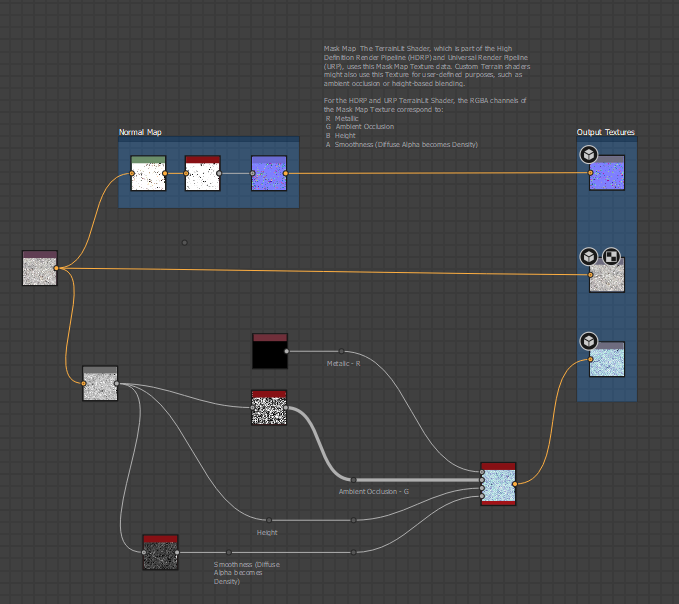
Working Substance Designer Template for generating Unity3D Terrain Layer

As promised what feels half a century ago, I now have the correct and working template for creating Unity3D URP/HDRP Terrain Layers, with Diffuse, Normal and Mask Map.

Substance Graph

Of course this is only the rough template. It also just converts the inverted graymap from the input bitmap node for smoothness (0=rough, 1=smooth) and sets metal to 0 (no metal). You will have to change that depending of the type of terrain layer you create. (obvious, but I thought I just say it).

But the mask generation is now 100% working, I tested it thoroughly.

You can download the template substance designer file here.

Thoughts and Insight Notes

Here I just write down thoughts and notes that came up during developing.

Finite State Machines vs. Behavioural Trees

So with FSM you have a dedicated class for one task. For example „Walk to Food“. You then can set the food object by casting the base class state class to the Walk ToFood class and access the member that holds the food object, thus its position.

With Behavioural Tress you need to pass a context, like a dictionary consisting of a Object/Unity.Object and a identifier string.

Not sure yet which is better in which situation.

Generic Fluid Shader Reproduction Try

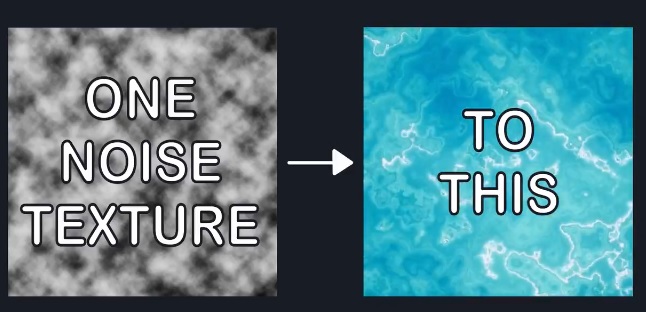
Well, I saw this post on twitter :

Will I be able to do that in Unity with Shader Graph ? We will see. I am not really good in Shader Graph, although I did some previous shaders with it and always managed to get what I wanted. (Reminder to myself : Post them here)

STEP ONE

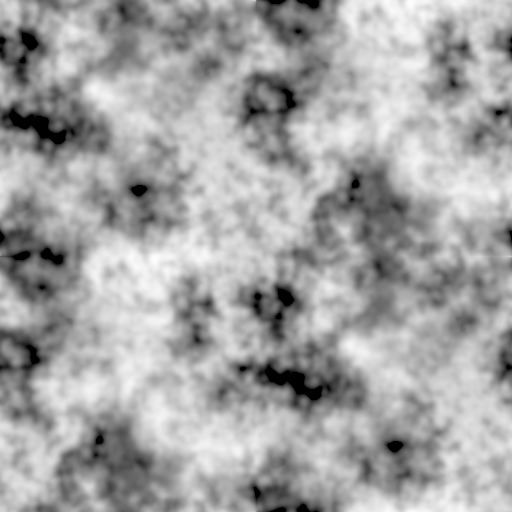
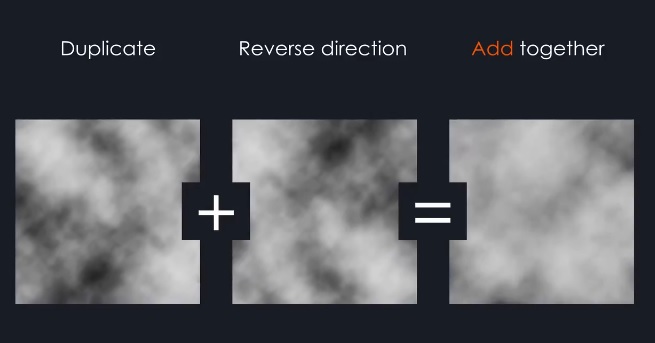
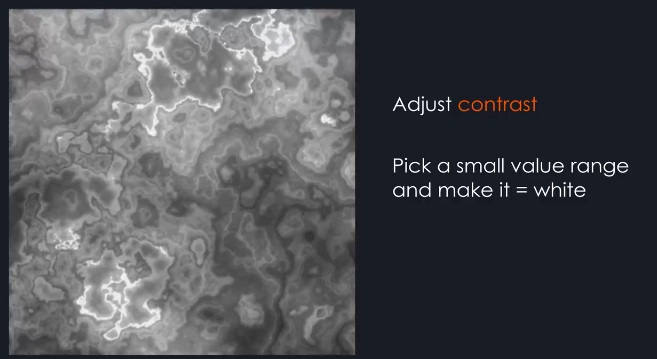
Good. Let me just start Gimp and do something like that. So in the Filter > Render -> Noise menu there are „difference-clouds“ which is exactly what I was looking for but sadly not scaleable or anything. So I took Plasma, desaturated it and did a slight gaussian blur on it.

Step Two

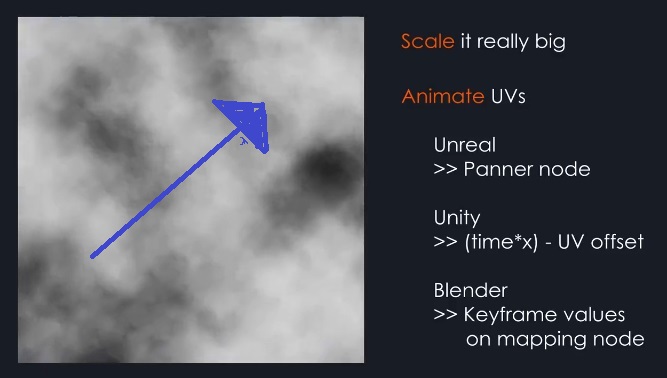
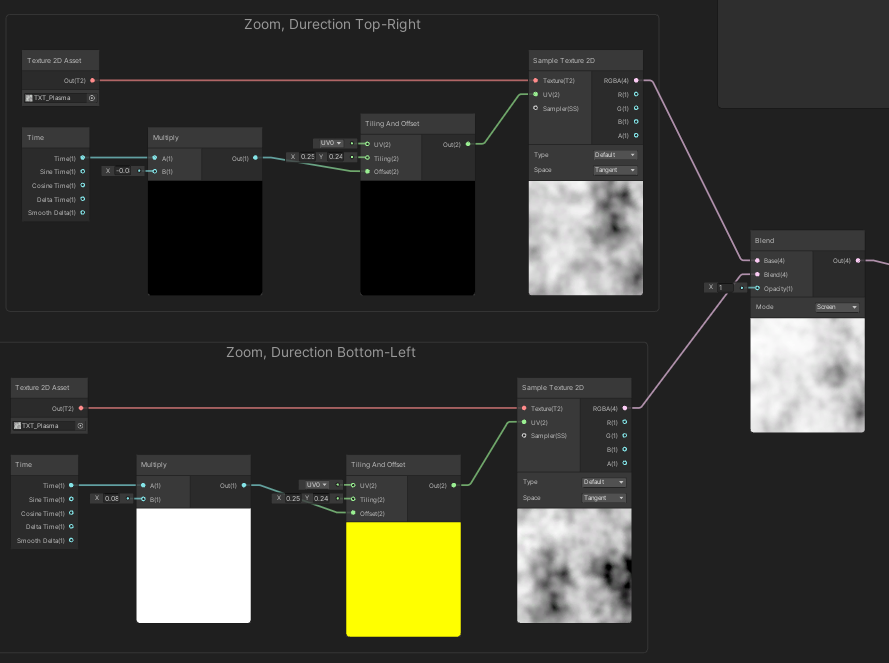
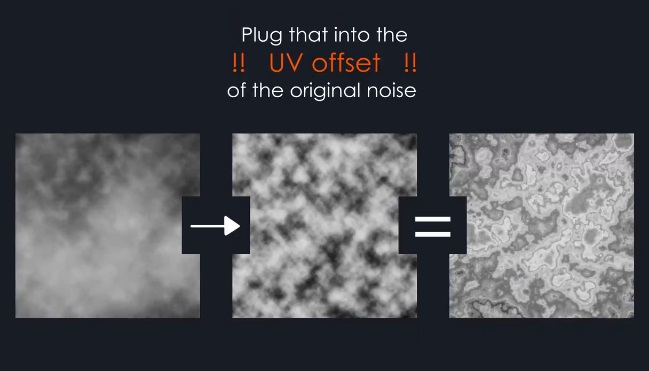
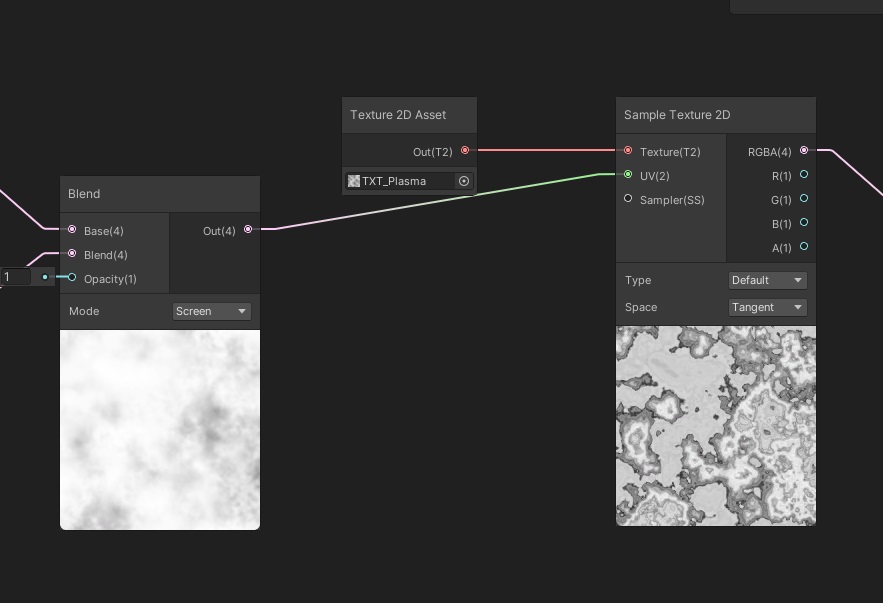
Right. The animation direction is top-right. So let me do that in Unity. After totally black out how to this () I remember how to do it.

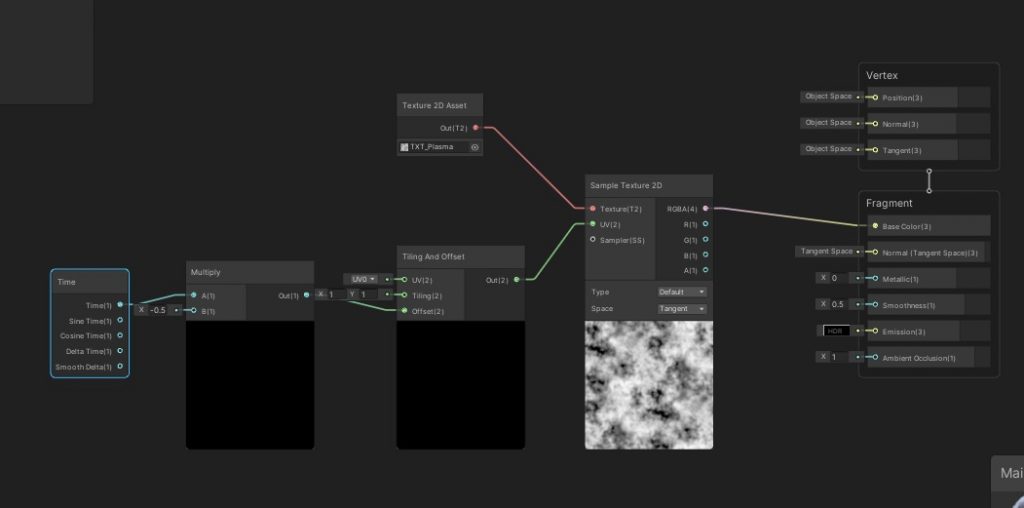
Using time to move the uv offset and multiple time by -0.5 so it scrolls in the right direction in the right timing. (the uv is the image that maps the surface 3D positions to a point on the 2D texture, for those who don’t remember). Ah I forgot one step you also have to set the tiling to 0.1 so it zoom big into the texture.

STEP THREE

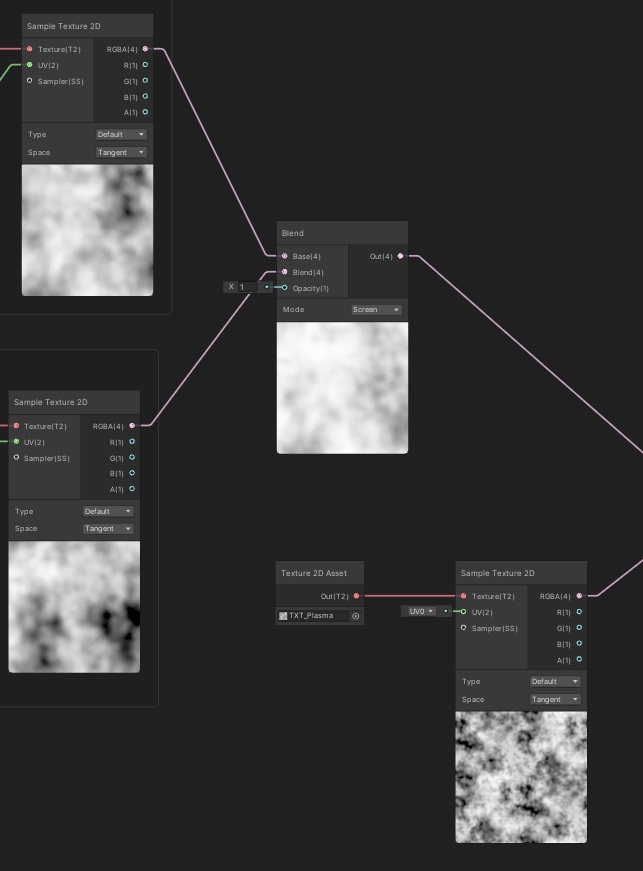
All right. I use a Blend Node with Screen Mode to do that. Not sure if that the right mode, but as I remember from working with Substance Deisgner, Screen Mode is basicly mixing two textures together.

STEP FOUR

Well ok, on it.

Done. 🙂

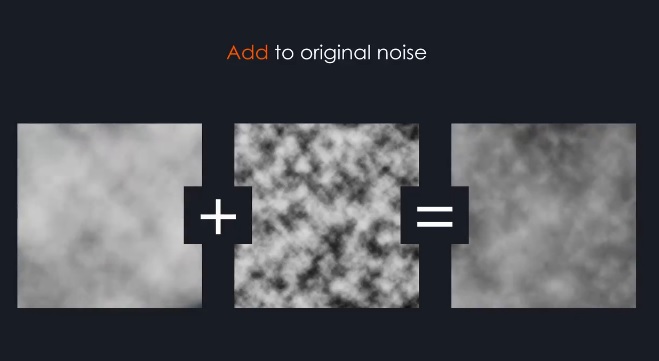
STEP FIVE

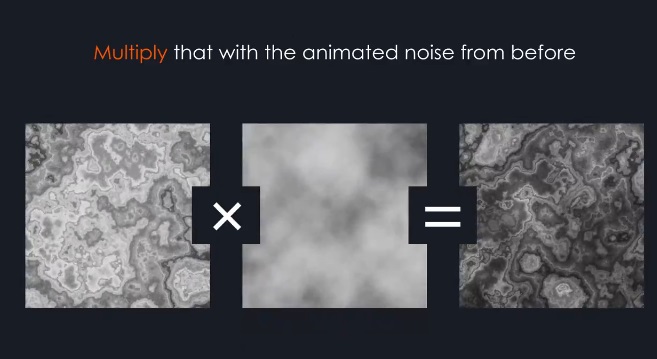
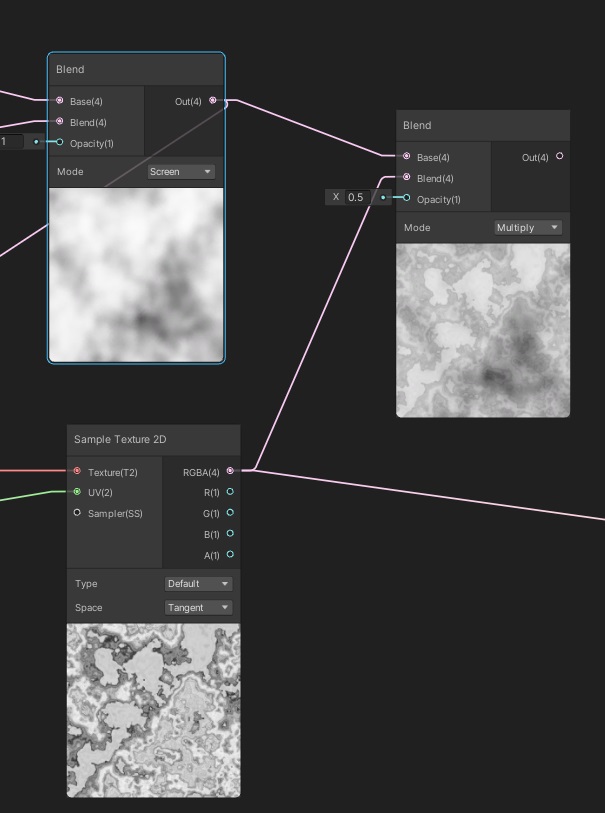
Uh, well, ooook. XD

Here we goooo.

STEP SIX

If you say so. 🙂

STEP SEVEN

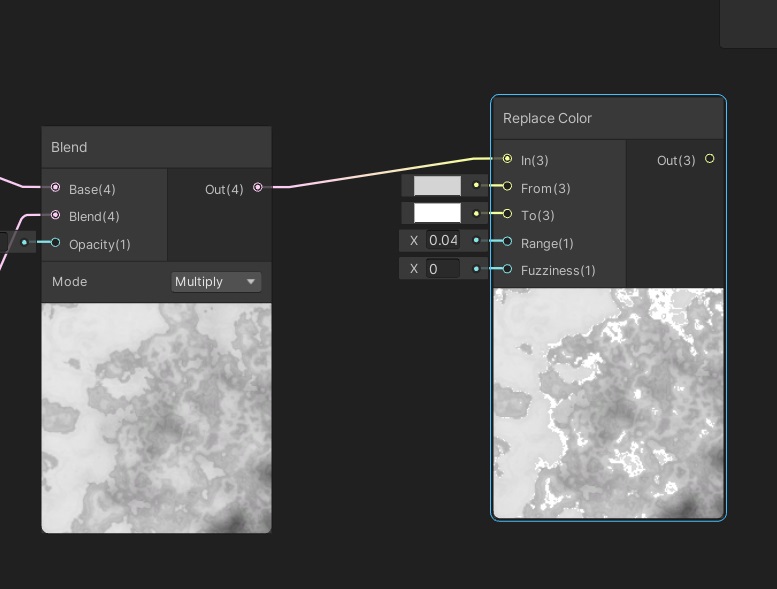
So I have no clue atm how to do this in Unity Shader Graph. Buuut I think the Replace Colors Node is what I want and yes this did kinda work out.

FINAL STEP 8

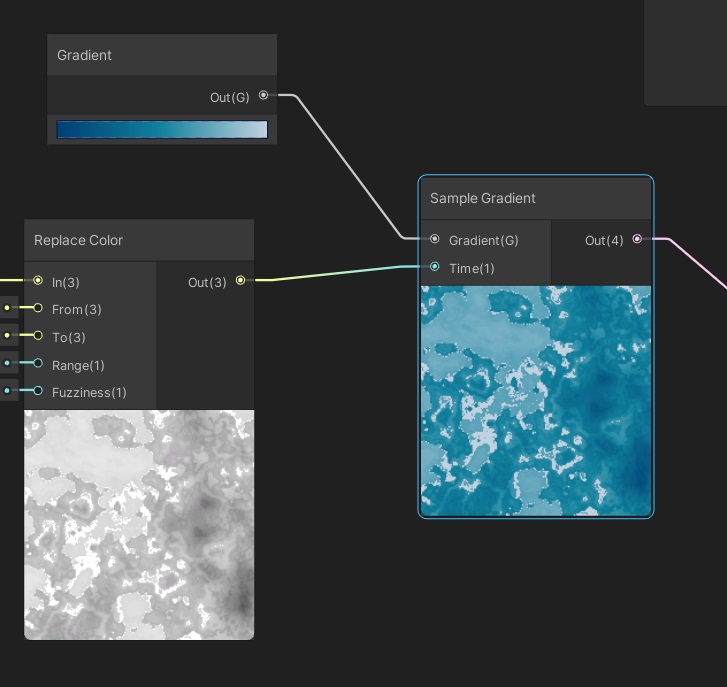
All right, this translated into shader graph :

Conclusion

This was a quick morning experiment, and it does not look like the original. At least not yet. But it was worth the try and it certainly is something. I will try to perfect it at a later time. Then I also will make the shader graph asset downloadable. Shout outs to the orginal author of the tweet ! XD

Unity3D : Global Debug On/Off

I have a custom template class for new C# class in Unity. Mostly cause I was too „lazy“ to use a debug singelton class or enhance the GameObject/Object class with a custom debug function.

        protected void dbg(string message, bool error = false)
        {
            if (debugMode & !error)
                Debug.Log("[ " + this.GetType().Name + " ( " + Time.time + " / " + Time.frameCount + " )] " + message);

            if (error)
                Debug.LogError("<color=\"red\">[" + this.GetType().Name + " (" + Time.time + ")] " + message + "</color>");
        }

So now I have a lot of Classes using this function and it can be turned off in the inspector with a toggle. But after a while of course this ends in chaos, since when you just want a certain aspect you are working appear in the console, you have to go through all of those classes and turn debug off manualy.

Instead I now added a static menu function that uses reflection to turn the debug state of each class on or off globally.

#if UNITY_EDITOR

using UnityEditor;
using System.Reflection;

#endif

        [MenuItem("InterAction Project/Global Debug Toogle - On")]
        public static void GlobalDebugToggleOn()
        {
            List<Component> componentsWithDebugModeMember = new List<Component>();

            GameObject[] allGameObjects = FindObjectsOfType<GameObject>();

            foreach (GameObject gO in allGameObjects)
            {
                Component[] components = gO.GetComponents(typeof(Component));
                foreach (Component component in components)
                {
                    Type typeOfComponent;

                    typeOfComponent = component.GetType();

                    var f = typeOfComponent.GetField("debugMode");

                    if (f != null)
                    {
                        foreach (FieldInfo propBase in component.GetType().GetFields())
                        {
     
                            if (propBase.Name == "debugMode")
                                propBase.SetValue(component, true);

                        }

                    }
                }
            }
        }

Then I can turn on only the Classes I actually need to display debug informations at the moment. Nothing fancy, but I think it may be useful for some of you out there. 🙂

I need an inventory for Interaction Project – Part 2

Actually, the Game Foundation package from Unity itself is pretty neat.

I just need the Inventory System from it for now. It also offers a currency system, a trade system with a transaction system and some kind of reward system.

There are some tutorials on the package page, yet they are not updated to the latest version and some things have changed, so one must think a bit.

It is pretty easy to use and the editor interfaces are very nice.

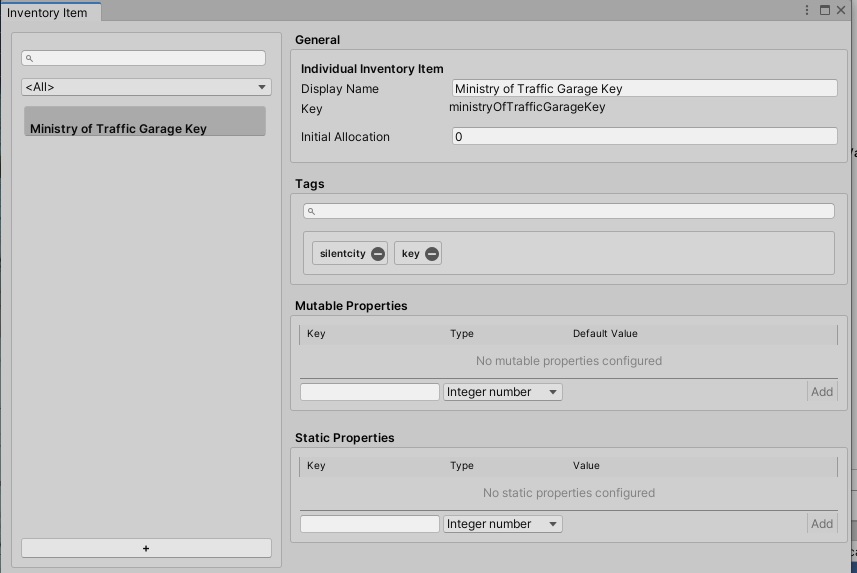
Example of an InventoryItem definition, on the left side the overview with all inventory item definition, well there is just this one at the moment, so 🙂

Since I want to be able to choose an item definition in an Action, so that the item can be instanced and given to the player, I need a way to list all item definitions in the catalog.

This is done by using one of the catalog API methods, as shown by a post on the unity forums. At the start I was not sure which type to use for the CatalogItemAsset ICollection which is of course an InventoryItemDefinition List.

    // You can use any type of catalog item for this list.
    List<InventoryItemDefinition> itemDefinitions = new List<InventoryItemDefinition>();
    GameFoundationSdk.catalog.GetItems(itemDefinitions);
 
    foreach (InventoryItemDefinition definition in itemDefinitions)
    {
        // Process your definition here ...
    }

My next problem is that I want a nice way to present the available ItemDefinitions in the custom Action Editor. Right now one could go into the catalag asset and open it and drag the containing InventoryItemDefinition Scritable into the Action ItemToAdd List, but yikes.

So what I really, really would like to have is that nice overview and filter/search listing element in the image above and let it pop up in a window so one can just doubleclick on an InventoryItemDefition and it would add it to the list in the custom Action inspector. Hmm. Onwards to adventure, maybe I can check out how to do this.

I need an Inventory. To put stuff in. And take stuff out. You know. A first look.

I need an inventory system. Mainly for the Interaction Project. Of course an inventory system consists of two parts, the Inventory Data and the Inventory UI.

Let me check my option here first :

Option 1 : Write one myself.
Option 2 : Use a free one
Option 3 : Try to utilize Unitys Game Foundation
Option 4: Buy one on the Asset Store

Option 1 is tedious. I already wrote one for Interaction Project. But besides the fact that it was poorly designed, it was bound to the Interaction Project way to close. While something like that is done fast, doing it right is not done fast.

Option 2 is ok, there are several open source inventory systems. But the learning curve, the quality check and also checking if there is still active development also takes time. And it has to be adaptable to the Interaction Project, which I plan to do by using an interface.

Option 3 is interesting. The Game Foundation seems high quality and provides one part of the Inventory, the Data Layer for it. It also has a currency system. Mainly done for making predatory mobile games, nevertheless it seems to be what I need. Will definitly try it out.

Option 4 requires a bit of research and of course money. (which is totally ok for an external quality asset that saves time and/or enhances the posibilites)

Between Lost Places – The Silent City Part 1

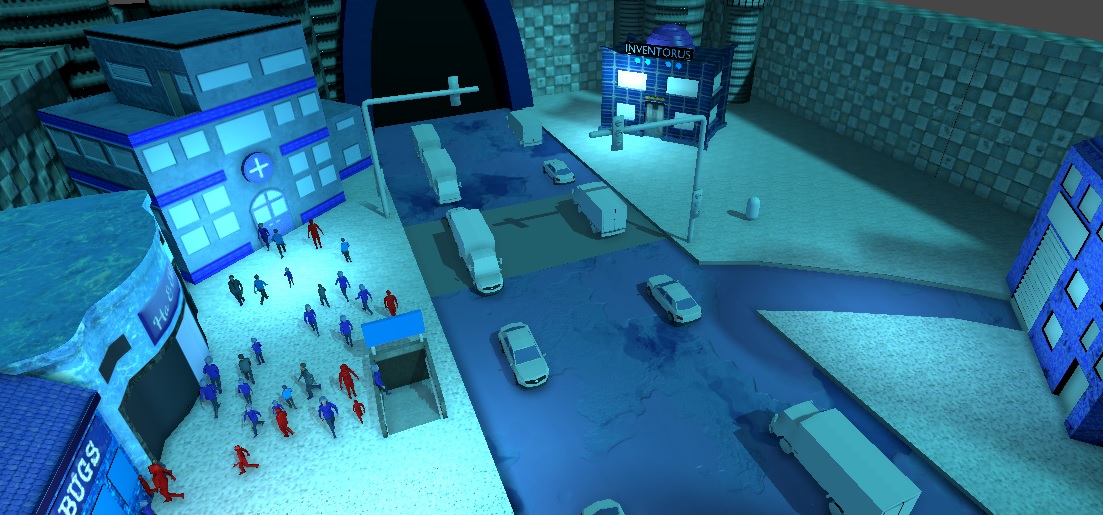
I am still working on a blue-orangish small city, surrounded by walls and mountins. Only one big street is passing through. One the one side there are several shops and people shopping. On the other side there is the traffic department and an inventor house.

The player has to cross the street to get through the busy city shopping area to the exit to the next area. BUT : The city shopping people have a virus and are spreading it. They do not wear masks. So the player has to find a way to cross the street, avoid being infected and find the exit.

Navigation of the shopping NPCS

I had several things to do here : First, a simple NPC AI System, which lets the shopping NPC spawn at several points like the shop doors or the subway entrances. Then they need to move to one another of these points.

I solved that with the build in Navigation System of Unity3D.

Pooling the shopping NPCs with kPooling

But the spawing of a lot of NPCs could not be done without a pooling system. Instanciating them every time would have slowed down it too much. I found this open source pooling system, kPooling, and it is really amazing. (thanks a lot to Kink3D, a former employe of Unity3D for that).

So everytime a NPC reaches a destionation, I give the NPC gameobject back to the pool and take one if one needs to spawn from it.

The Virus

There are two things with the virus : A Shopping NPC can be infected in various grades. But how to visuale this to the player ? I choose to make a graph shader, that uses a red gradient color to indicate how much the infection has progressed in an infected shopping NPC. Why is this important ? First, the player can aquire argumented reality glasses ingame, that show him this. And : the more a NPC is infected, the greater is the area in which peole get infected in front of him when he coughs.

Writing this shader was a bit tricky, I will publish it here for free use later, also I have to ask in the Unity Forums if there is a better way to do it, but for now I am happy that I found a way to actually do a shader that provides the needed functionality.

More in Part 2 soon.

Blender – Making an UV Map for many seperate tiles but spare me the hand work :D

NOTICE : I just found out you just can select all seperated objects, go into Edit Mode and then create a UV Map for all of them at once. But I will let stand this article here for documentation purposes. 😀

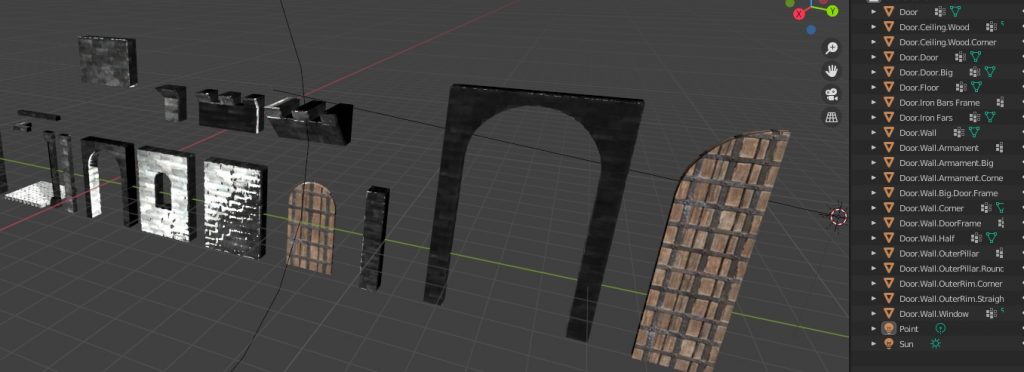
I have a set of tiles, for example a castle. So I wanted to use just one UV Map for all of them, but I still needed them as single objects.

Doing this by hand is tedious. So I managed to find and adapt two python scripts, who do this for you.

As you can see every object has a name, that I will later need in the game engine, for example in Unity3D, to make a Prefab out of it.

So with every object selected, I use a script I adapted to generate a vertex group for every object for all its verticies in one group, which is named exactly as the object is named.

import bpy

selection_names = [obj.name for obj in bpy.context.selected_objects]

#adds all vertices to a vertix group with the object name

for name in selection_names:
    vg = bpy.data.objects[name].vertex_groups.new(name=name)
    verts = []
    for vert in bpy.data.objects[name].data.vertices:
        verts.append(vert.index)
    vg.add(verts, 1.0, 'ADD')

After that I join all the objects with Ctrl-J as usual, resulting in only one Object but all the vertex groups are still set correctly.

Then I auto-create the UV Map for the single object.

With this script ( I have to find where I found it again and by whom ) then I automatically seperate every object using the vertex groups and the name of the vertex group.

# coding=utf8
import bpy


def main():
    origin_name = bpy.context.active_object.name
    keys = bpy.context.object.vertex_groups.keys()
    real_keys = []
    for gr in keys:
        bpy.ops.object.mode_set(mode="EDIT")
        # Set the vertex group as active
        bpy.ops.object.vertex_group_set_active(group=gr)

        # Deselect all verts and select only current VG
        bpy.ops.mesh.select_all(action='DESELECT')
        bpy.ops.object.vertex_group_select()
        # bpy.ops.mesh.select_all(action='INVERT')
        try:
            bpy.ops.mesh.separate(type="SELECTED")
            real_keys.append(gr)
        except:
            pass
    for i in range(1, len(real_keys) + 1):
        bpy.data.objects['{}.{:03d}'.format(origin_name, i)].name = '{}.{}'.format(
            origin_name, real_keys[i - 1])


if __name__ == '__main__':
    main()

After that I have all the objects seperated named correctly, using their part of the shared UVMAP. 😀

Now I use the combined one to paint it in a PBR Software like Substance Painter or Armor Paint to generate the big texture using the combined texture.

This approach saves me hours. It might not be the best thing to use big 2K textures but it saves loading time and makes changing whole tilesets textures easier.

The flag of Interaction – more about the FlagSystem of Interaction Project

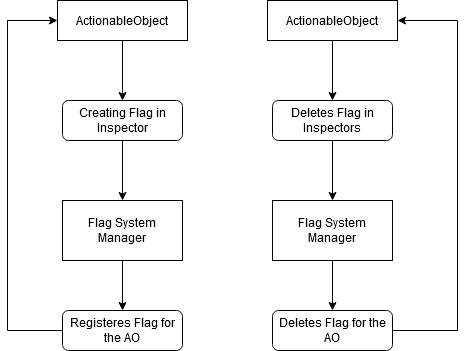
To speed up the whole flag system handling, I wrote a custom inspector for the ActionableObject class.

The flags for the Actionable Object can easily be created/deleted in the custom inspector. Also the initial status can be set.

Important is here that by creating/deleting Flags for that ActionableObject they automatically get registered in the Flag System Manager.

With this other ActionableObjects as well every other Object that uses the flag system can access the flags in their Actions.

Every AO or any object that wants to use Flags need a FlagDependency List.

A custom property drawer for it handles everything inside it, so there is no need for any calls to the class which the FlagDependency List is part of.

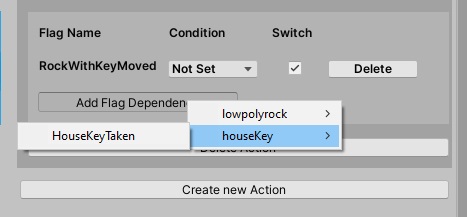
But how to keep track of all the flags of all objects ? Here comes the „Add Flag Dependency“ Button into play. This button opens a menu that has a list of all available flags for all Objects that have registered flags.

So much for that now.